

VST plugins - tutorial and download.
Here are a the 3rd party VST plugins that I use in my tracks. You can download them for free:
- Ambience (alternative download)
A reverb plugin. - BuzComp Free Series (alternative download)
A collection of free compressor effects, perfect for mastering purposes. - cadmium
A dirty synth from my demoscene group mate wrl/SVatG. - CamelCrusher
With this plugin, you can colour your audio signal in various ways. It offers distortion, EQ and compression. - Delay Lama (alternative download)
A singing monk! A classic among all VSTis. - Electri-Q (posihfopit edition) (alternative download)
Electri-Q is a very advanced, yet handy equalizer. - epicVerb (alternative download)
A truly epic reverb. - FREEVERB
A simple but good reverb. - JS (alternative download)
This collection is quite old. It may cause trouble in your plugin host as all plugins have the same UID and cause playback errors. Don't use it. It's just here so you can listen to my tunes. - Kjaerhus Classic Series
Some really good free plugins. - Korg M1
Virtual remake of the first workstation, the famous Korg M1. Obviously, this plugin is not free. - Korg MDE-X
A virtual recreation of the high-quality DSP effects of the Korg Triton, and one of my favourite effect plugins. Obviously, this plugin is not free. - Korg Wavestation
Virtual remake of the Korg Wavestation. Obviously, this plugin is not free. - MB Puncher (alternative download)
A handy puncher effect. - mda (alternative download)
A very useful and handy plugin collection, also available for Macintosh computers. - Microgater (alternative download)
A straight-forward gate plugin which can be used to emulate sidechain compression. - otiumFX Basslane (alternative download)
This plugin modifies the stereo width below a given frequency - Rez 2.0 (alternative download)
A virtual analog monosynth, with a highly resonant low pass filter - sfz
A soundfont player. - SideKick v3
A plugin for sidechain compression which is also suitable for hosts like OpenMPT that normally can't do sidechaining. A superior version 4 has already been released, but it's shareware. Requires the Visual C++ 2003 Runtime (MSVCR71.DLL), which has to be copied to C:\Windows\System32\ on 32 bit systems or C:\Windows\SysWOW64\ on 64 bit systems respectively. - Sleepy-Time Records Transient (alternative download)
A simple transient shaper plugin. - SQ8L (alternative download)
A fantastic emulation of the Ensoniq SQ80 synth. - String Theory 1.5 (alternative download)
A physical modeling synth which is capable of emulating plucked strings, atmospheric pads and similar stuff. - SupaPhaser (alternative download)
A nice Phaser plugin. - Surge (alternative download)
A flexible, originally commercial synth now resurfaced as an open-source plugin. - Synth1 1.13 (alternative download)
A classic among the virtual synths. - TAL-BassLine (alternative download)
A nice synth for creating electro bass sounds. - TAL-Elek7ro (alternative download)
A small but good FM synth. - TriDirt (alternative download)
Useful plugin for distorting sounds, there are three frequency bands and each can be distorted differently. - Voxengo MSED (alternative download)
A simple and free plugin to edit the mid and side signals independently.
Please keep in mind that not all plugins that I host are necessarily up-to-date. Usually, I provide the version that I personally use.
So you downloaded a module which requires VST plugins? And you don't know how to use them? Here is a small tutorial for OpenMPT:
Step 1: Open a module
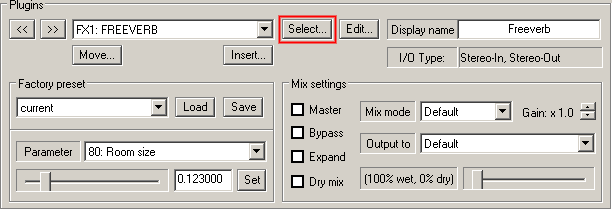
Run OpenMPT and open your module or just a new module to avoid the warnings.
In the lower third of the "general" tab, you'll find the plugin settings.
Hit the "Select" button in that part of the window (marked red in the screenshot).
Step 2: Add plugins
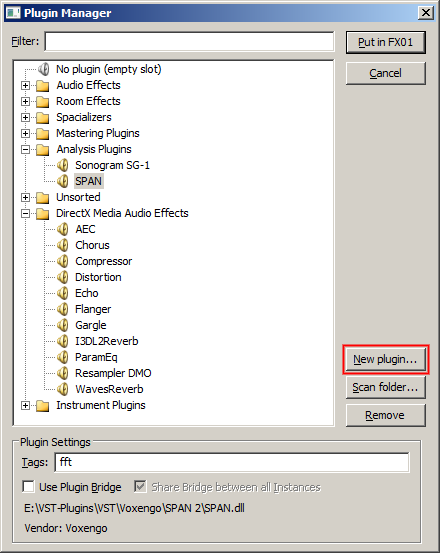
You will see a list of plugins that OpenMPT already knows. If you have never used VST plugins before, you will maybe only see the DirectX media effects.
Hit the "New plugin" button (marked red in the screenshot) and browse to the folder in which you saved your plugins. I recommend a central folder for all your plugins, something like C:\Program Files\OpenMPT\Plugins.
Speedy method
Actually, this process can be shortened a lot! You can simply drag the plugin files (DLL files) on the OpenMPT window to register them in the tracker.
More information about plugins
You may find further information about VST plugins and OpenMPT in the English OpenMPT wiki.